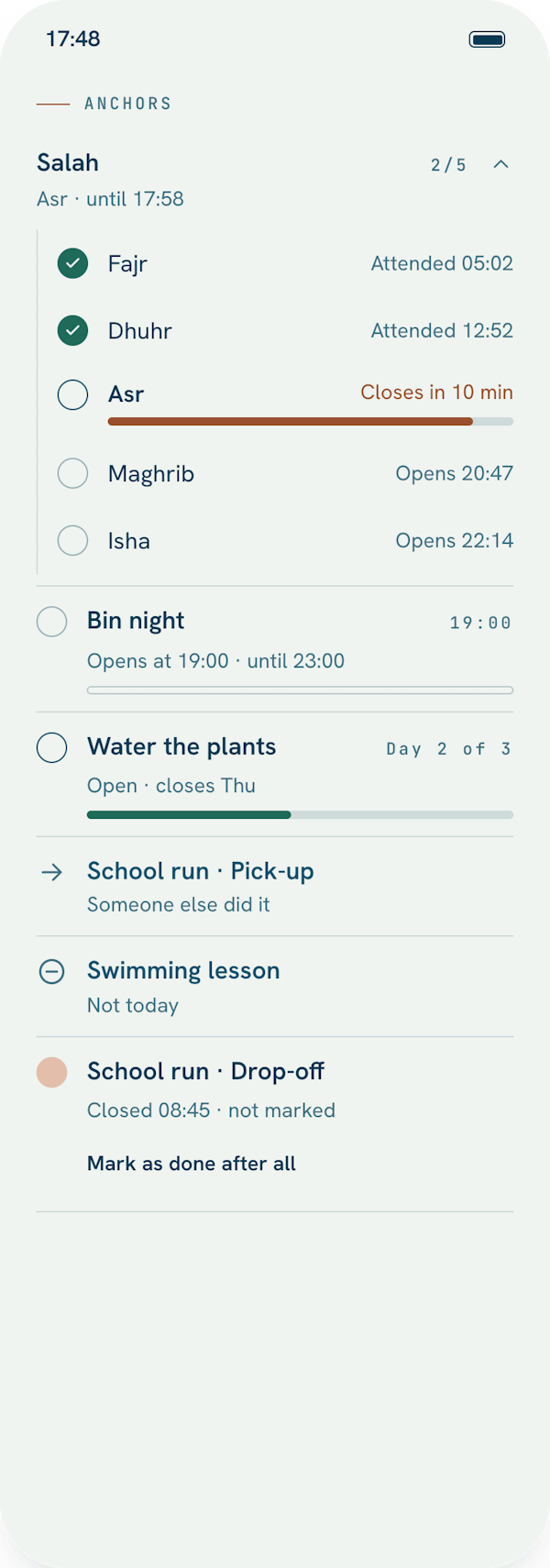
Anchors: the things your day moves around.
A task is something you do when you can. An Anchor is different: its time is set by something outside you. The school gates open when they open. The bins go out on the night they go out.
What an Anchor is
Every Anchor has a window: a time it begins and how long it stays open. Dhuhr might open at the call to prayer and stay open until Asr. The school run might be a half-hour around three.
You don't tick it off. You say what happened to it, and there are three honest answers:
- Attended. You made it.
- Not today. You chose to skip it.
- Someone else did it. Someone else did it for you.
If the window closes without an answer, Jamaal reads it as a plain fact, "window closed at 15:30", not a failure. And if you did do it after all, you can mark it done later that same day.
Rules, and one-offs
Most Anchors come from a rule: certain days of the week, every few days or weeks, or "a few days after the last time", which suits watering plants. A rule can have more than one time in a day, like drop-off and pick-up, and Jamaal makes the Anchors for today and tomorrow for you.
For something that happens once, like a dentist visit, add a one-off Anchor from the same plus sheet you use for tasks, and switch it to Anchor.
Prayer times
If prayer times matter to you, Jamaal can set them up as Anchors: you choose which prayers, and it works out the times from where you are. It asks for your location only while the app is open, and only for this; the location stays on your device. You can also pick a place by searching for a city, and choose a calculation method that suits your region. There is a longer guide for Salah, Qur'an and dhikr.
Taking a break
An Anchor rule can take a break, for a trip or a season, without losing the rule itself. It goes quiet and comes back when you say so.
On Today and on your Lock Screen
Anchors sit at the top of Today, sorted by when they open. A rule with several times appears as one tidy row, with a count of how many you've attended. The Next Anchor widget shows the one that's open, or the next to open, on your Home Screen and Lock Screen.